Motorized locks in Homelok
Overview
This section details how to create and configure motorized electronic locks like the DLok.
The main difference between motorized locks and other electronic lock types is that motorized locks contain an integrated motor that enables automatic locking and unlocking functionality, and may require additional configuration steps depending on the specific lock model. Some motorized locks have a series of custom settings which are described in more detail below.
Salto Homelok currently supports the DLok. This is a specific type of motorized electronic lock that follows the same configuration process as other electronic locks.
Ensure that you read this section in conjunction with the section on configuring motorized locks for installers.
Creating motorized locks
You create motorized locks in the same way as you would create a standard door and its associated electronic lock. See the section on creating doors for more details.
Motorized lock settings
Depending on the type of motorized lock, once it has been set up and configured initially, you will see a series of custom settings. These settings are split across two places:
- Opening mode and Autolock timer are properties of the door, not the lock - you edit them from the Doors section. See how to configure doors for the general behavior, and Autolock timer below for the DLok-specific values.
- Hold back latch and Force rotation to the end are properties of the electronic lock device itself - you edit them from the Devices section.
Unlike Autolock timer, which only applies when the door's opening mode is set to Autolock (formerly standard), Hold back latch and Force rotation to the end work the same way regardless of the door's opening mode.
Device-level custom settings only display if the lock has been previously configured with the Nebula Commissioning app and identified as a motorized lock.
DLok settings
The following settings are available for the DLok:
- Opening mode (door setting)
- Autolock timer (door setting)
- Hold back latch (device setting)
- Force rotation to the end (device setting)
To edit the device settings, go to Devices, select the three-dot menu for the lock you want to modify, and select Edit.
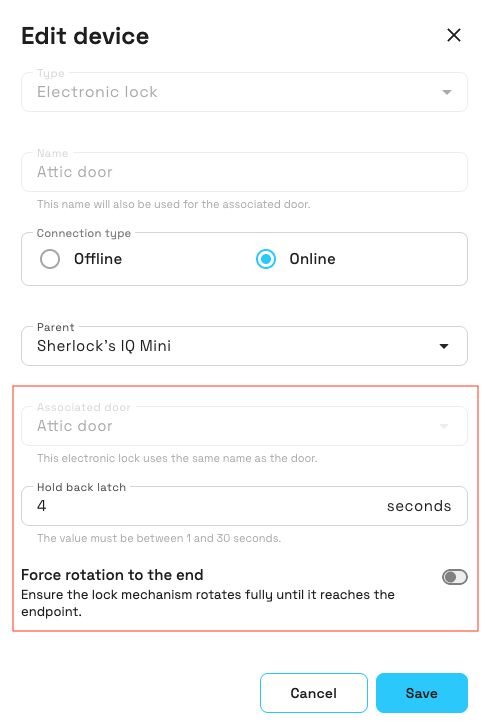 Editing settings for motorized locks
Opening mode schedules cannot be configured for the DLok through the Homelok web or Nebula Commissioning app interfaces.
For more on configuring opening modes, see the dedicated section on opening modes.
Autolock timer
Autolock timer is edited on the door, in a similar way to Unlock duration, and only displays if the door's opening mode is set to Autolock (formerly standard). You can use this option to define a time period after which the DLok will automatically lock the door.
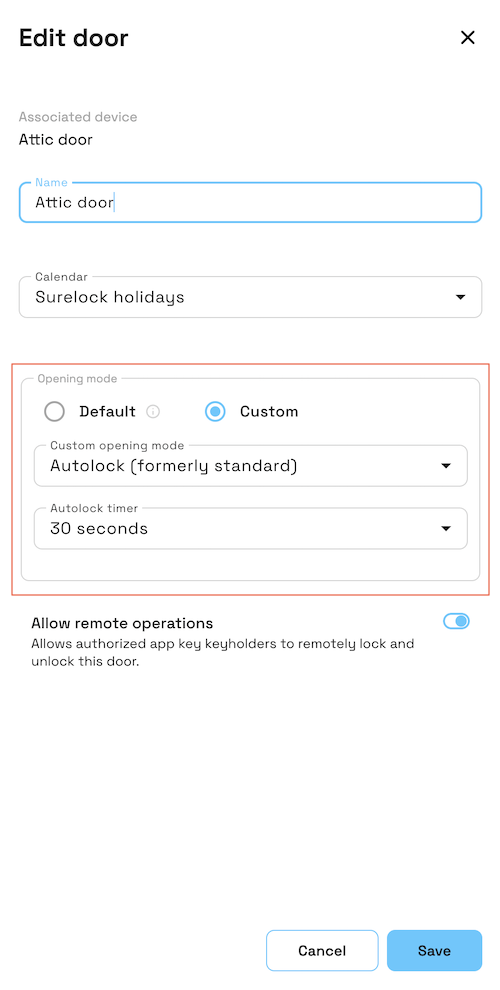 The Autolock timer field displays on the door when its opening mode is set to Autolock (formerly standard)
Homelok web offers the following time periods:
- 30 seconds
- 1 minute
- 2 minutes
- 3 minutes
- 4 minutes
- 5 minutes
- 10 minutes
- 15 minutes
- 30 minutes
The Autolock timer field is dependent on selecting the Autolock (formerly standard) opening mode. If you select a different opening mode, this option will not display.
Hold back latch
Hold back latch refers to holding back the latch of the lock mechanism for a specified time after unlocking the door. If an installer has configured the lock to hold back the latch when they added the lock to the installation, here you can configure the time you want to hold back the latch for.
You can also configure the lock to hold back the latch for any time between 1 and 30 seconds.
This option only applies to locks that have a latch mechanism. If your lock does not have a latch, this option will not display. This option can only be enabled or disabled in the calibration process.
Force rotation to the end
The Force rotation to the end process is designed to calibrate locks automatically where it's not possible to rotate the DLok by turning a key. Some locks have a design where turning the key doesn't directly rotate the internal mechanism. Instead, the key might engage an internal clutch or electronic system that then triggers the locking/unlocking. These types of cylinders are often referred to as "double clutch locks". The Force rotation to the end process can also be used on other types of access points like panic bar solutions, for example.
If enabled, the lock operates by turning automatically in one direction until it reaches the end.
You should only use this mode if you have a lock mechanism where it's not possible to rotate the DLok on the inside of the door by turning the key from the outside.
Check with your installer or usual Salto contact if you are unsure about whether to enable this option.
 Back
Electronic locks
Back
Electronic locks Gateways