Remote operations for keyholders in Homelok
Overview
By default, owners and property managers can remotely lock and unlock online doors from Homelok web or the Homelok app. They need the correct access to the door, and the door must be online and connected. Remote locking also requires a motorized lock.
This section describes settings that let you extend remote locking and unlocking to unit managers and keyholders, using their app key. A user must have an app key assigned to use this feature: see the section on assigning keys for more information.
To enable remote locking and unlocking for a keyholder's app key, both of the following settings must be configured:
- An Allow remote operations setting on the door, which determines if remote actions are allowed at that door.
- An Allow remote operations setting on the user's app key, which determines if that user is allowed to trigger remote actions.
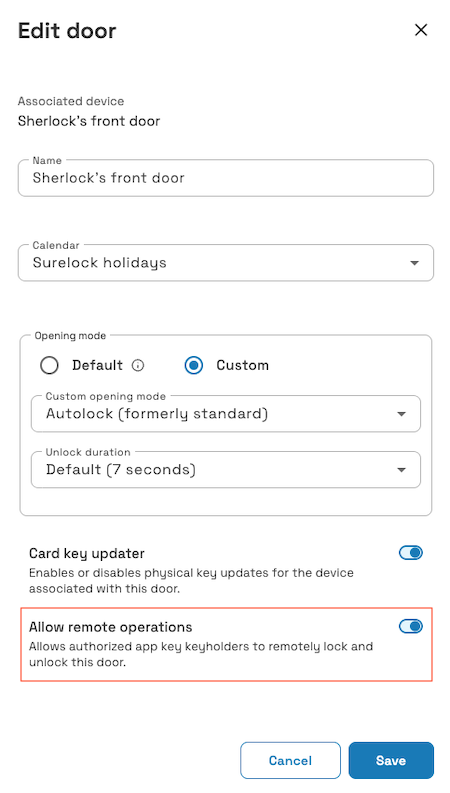 First enable the 'Allow remote operations' setting on the door
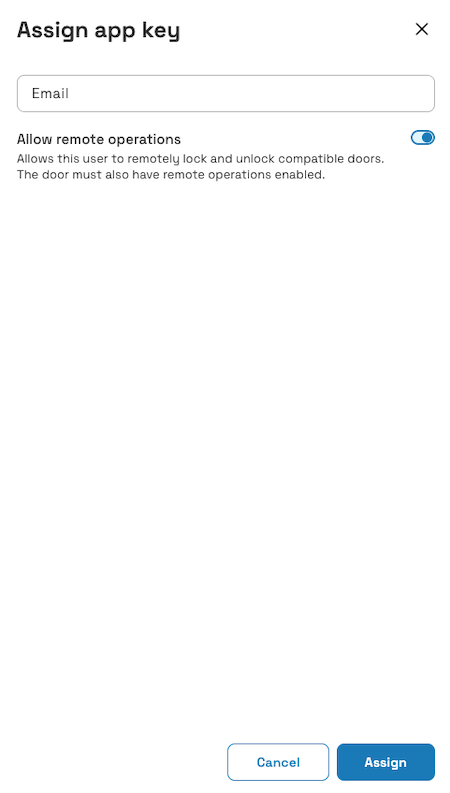 Next, enable the 'Allow remote operations' setting on the user's app key
How the door and app key settings interact
The ability to lock or unlock doors depends on the model of the lock. For example, a motorized lock like the DLok can be both locked or unlocked. In Homelok, these settings display as a single Allow remote operations checkbox on both the door and the user's app key. Enabling the checkbox permits remote operations, subject to the user's access, door connectivity and supported lock hardware. Disabling it disallows both.
| App key allows | Door allows | Result |
|---|---|---|
| Nothing | Nothing | Blocked |
| Remote operations | Nothing | Blocked: the door doesn't allow it |
| Nothing | Remote operations | Blocked: the app key doesn't allow it |
| Remote operations | Remote operations | Allowed, subject to access, connectivity and supported hardware |
This lets you combine settings to fit real scenarios. For example, a unit manager could allow a user in their unit to remotely unlock doors (a member of their family) while not allowing another (a delivery person or maintenance worker). On the other hand, a property manager could allow remote unlocking for a building's main entrance but not for a shared pool gate.
For a keyholder, this process is seamless. When both settings are enabled, users with the correct door access can operate it even when not within Bluetooth range, as long as the door is online and connected. Remote locking requires a motorized lock. Note that keyholders will always be asked for confirmation before performing a remote operation from the Homelok app.
Door setting
Each door has an Allow remote operations checkbox, where the lock permits this (it must be online and connected for the functionality to work). This setting determines whether the door allows remote locking and unlocking by users other than owners and property managers.
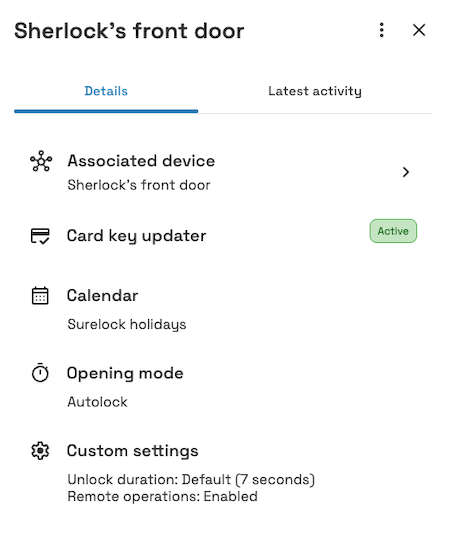 Once enabled, the door's settings indicate that remote operations are allowed
You can find this option in the door's settings, alongside options like Opening mode and Card key updater.
The Allow remote operations checkbox is disabled by default for both installation and unit doors.
Owners and property managers do not need this door setting enabled. They still need the correct door access, an online and connected door, and supported hardware for the requested operation. Remote locking requires a motorized lock.
App key setting
Once a door has the Allow remote operations setting enabled, you can allow individual keyholders to remotely lock and unlock it from their app key.
To do this, go to the user's profile and open the Manage keys panel described in the section on assigning keys. Beside the App key option, enable the Allow remote operations setting for that user.
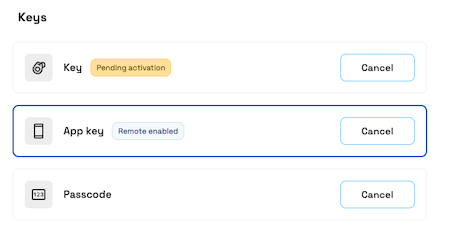 When you enable remote operations on a user's app key, the 'Remote enabled' label indicates that the setting is active.
Whether this setting is available, and its default value, depends on the type of user:
| User type | Configurable | Default |
|---|---|---|
| Installation user | Yes | Disabled |
| Unit user | Yes | Disabled |
| Unit manager | No | Always enabled |
Remote operations are always enabled on a unit manager's app key and can't be turned off.
Unit privacy considerations
Remote-operation permissions work the same way in a unit with privacy enabled as in any other unit. Because a unit manager's app key always allows remote operations, they need the door setting enabled as well as the correct door access, connectivity and supported hardware.
Remote lock and unlock activity in a private unit isn't visible to the property manager or owner, in the same way as other unit activity.
 Back
Creating doors
Back
Creating doors