Access denied reasons in Salto Homelok
Descripción general
This section explains the main reasons why access may be denied in Salto Homelok, how the system prioritizes these reasons and how to troubleshoot common issues related to denied access.
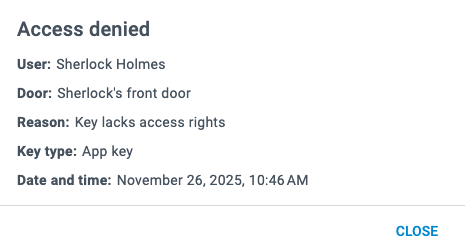 Example of an access denied event in Homelok
Access denied reasons
When access is denied to a user, the system provides specific reasons to help you understand why the access attempt failed. The following table shows the possible reasons and what they mean:
| Reason | Description |
|---|---|
| Key expired | The user's key has passed its expiration date and is no longer valid. |
| Key not activated | The user's key has not yet reached its activation date and time. |
| Key lacks access rights | The user's key does not have permission to access this door. |
| Outside permitted schedule | Access was attempted on a day when the user's schedule does not allow entry (for example, attempting access on a weekend when only weekday access is permitted). |
| Invalid passcode | The numeric passcode entered on the device keypad was incorrect or does not meet the required format. |
| Insufficient battery | Access was denied because the lock's battery doesn't have enough power to unlock. The lock mechanism cannot operate due to insufficient battery charge. Contact maintenance to replace device batteries. |
| Unspecified | The system was unable to determine a specific reason for the access denial. |
For more information about managing user schedules and key validity periods, see the section on expiration and validity.
Access denial priority
The system evaluates access denial reasons in the following priority order (from highest to lowest):
Troubleshooting common issues
Access denials without activity entries
If users report access denials but no events appear in activity logs, possible causes include:
Key-related issues:
- Key from different installation: Once a key has been issued in one installation it cannot be re-issued in another installation. You can use a newly-encoded key within the same installation for another user but it cannot be re-used in another installation.
- Corrupted key data: The key's data has been damaged or corrupted, making it unreadable.
- Wrong key type: The key format (card technology) is not compatible with the lock. In Homelok, only DESFire keys are recognized by the end devices. If other technology is presented, the reader does nothing (not even an access denied signal).
- Key not properly encoded: The key was not successfully programmed during the encoding process.
- Key removed too soon: The key was removed from the reader before the update finished.
Lock-related issues:
- Lock offline: The online lock lost connectivity (marked as Not connected) and cannot send events to the cloud (events may appear later when connection is restored).
- Hardware malfunction: Reader or internal lock components are faulty.
Diagnostic steps:
- Verify lock online/offline status (connected or not connected)
- Check lock battery status and firmware version
- Review key renewal duration and last online update
- Check the user's last key update time
- Request video evidence of lock behavior during access attempt
 Atrás
Tipos de evento
Atrás
Tipos de evento Eventos offline