Organizations and sites
Users who belong to a Salto partner or a business unit can manage their organizations from the XS4 Face Console. To open the organization management panel, click Manage Organisations at the bottom of the left-hand pane.
In Manage Organisations, select an organization to view and update its Partners, Business Units and sites.
Add a site
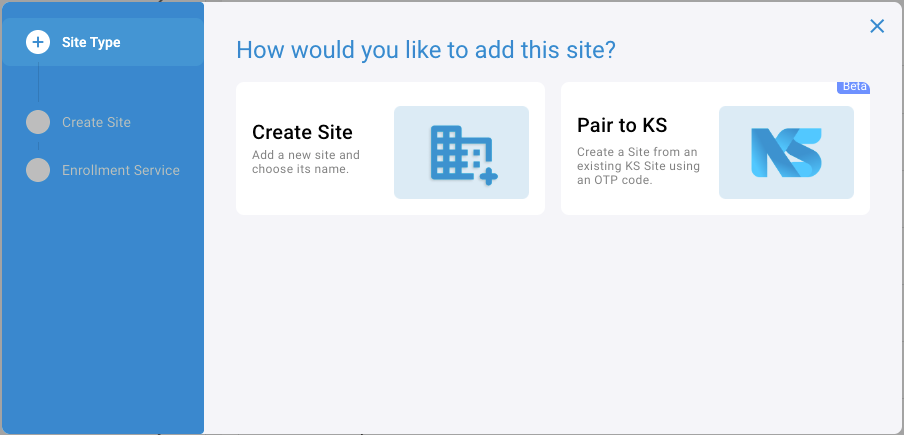
To add an XS4 Face Site, select the partner in Manage Organisations, then click Add New Site above its list of sites. The wizard first asks How would you like to add this site?:
- Create Site: Add a new site and choose its name.
- Pair to KS: Create the site from an existing Salto KS site, using a one-time code (OTP) from Salto KS.
If you exit the wizard before you finish, the XS4 Face Console asks you to confirm.
Create a site
- Select Create Site, then click Continue.
- Enter the Site Name, as it will appear throughout the system, and check the Partner for the site.
- Enter the details of the XS4 Face Enrollment Service for the site, then click Save.
Pair a site to Salto KS
Beta
Use this option to create an XS4 Face site that uses a Salto KS site for access control.
Prerequisites:
- XS4 Face is enabled for the Salto KS site, and you have the XS4 Face OTP for it.
- The credentials for the Salto KS Core Collection, which you request from Salto KS technical support.
- Select Pair to KS, then click Continue.
- Enter the details of the XS4 Face Enrollment Service for the site.
- In KS Configuration, enter the credentials for the Salto KS Core Collection.
- In Pair to KS, enter the XS4 Face OTP from the Salto KS site and check the Partner for the site, then click Save.
The site appears in the organization with the KS integration enabled. If the XS4 Face Console shows that the site was only partially created, contact Salto technical support.
 Back
Licensing
 Monitoring