Aceptar invitación
Si no tienes una Danalock pero necesitas acceso a una cerradura, el propietario de la cerradura debe invitarte.
Cuando el propietario envía una invitación, recibirás un correo electrónico.
Las instrucciones en el correo electrónico varían dependiendo de si ya tienes una cuenta de Danalock.
Ya tienes una cuenta de Danalock
Si ya tienes una cuenta de Danalock, haz clic en el botón azul My Danalock en el correo electrónico e inicia sesión.
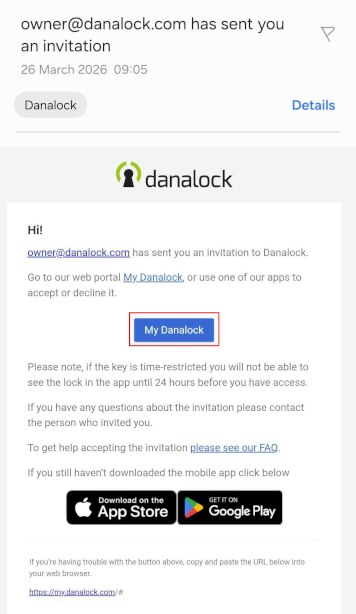 Haz clic en 'My Danalock' para iniciar sesión en tu cuenta de Danalock
Una vez iniciada la sesión, sigue los pasos en Cómo aceptar una invitación.
Necesitas crear una cuenta de Danalock
Si aún no tienes una cuenta, haz clic en el botón azul Set Up Account y crea una cuenta siguiendo la guía de creación de cuenta en la página de aplicaciones.
Una vez creada tu cuenta, vuelve aquí para continuar aceptando la invitación.
Haz clic en 'Set Up Account' para crear una cuenta de Danalock
Cómo aceptar una invitación
Sigue los pasos a continuación para aceptar la invitación:
- En tu página my.danalock.com, haz clic en las tres líneas en la esquina superior derecha.
Si estás aceptando la invitación en un PC, puedes hacer clic en Invitations para ver tus invitaciones recibidas.
- En el menú desplegable, haz clic en la flecha junto a Invitations y elige Received invitations.
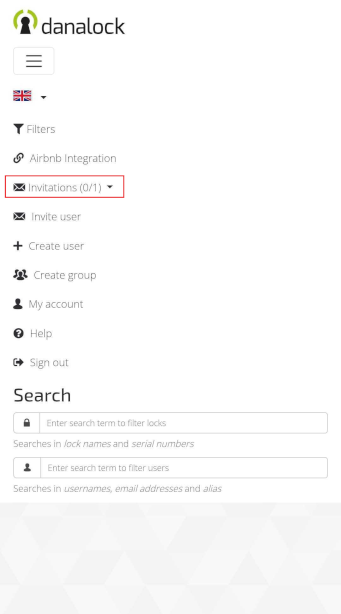 Haz clic en la flecha para ver las invitaciones recibidas
- En la ventana que se abre, puedes aceptar la invitación.
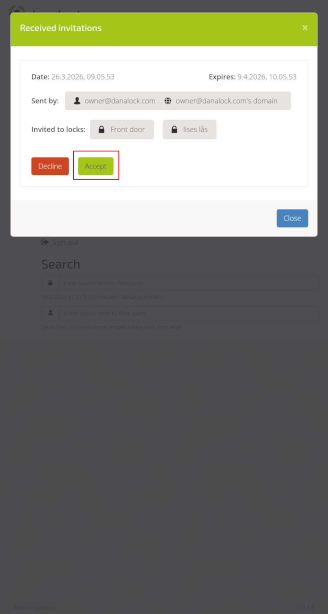 Haz clic en 'Accept' para obtener acceso a la cerradura
Después de aceptar la invitación, puedes iniciar sesión en la aplicación Danalock y acceder a la cerradura.
Si el propietario de la cerradura te ha dado acceso por un período de tiempo limitado, la cerradura solo aparecerá dentro de las 24 horas anteriores al inicio del período de acceso.
 Atrás
Atrás
 Atajos de iOS