Connectivity considerations for the Hospitality API
Overview
From version 6.10 onwards, Space includes a REST API endpoint designed to handle Apple Wallet key requests for the hospitality industry. This ensures that requests from Apple Wallet-compliant credential managers, located outside the customer premises, are served securely.
In this documentation, the term Hospitality wallet key manager refers to the credential manager software that connects to Space via the Hospitality API to manage the guest's wallet key lifecycle (issuance, revocation, etc.).
The Apple Wallet key functionality is license-dependent. See Registering and licensing Space for more information.
This section describes how to establish a secure and reliable integration between the Space software and credential managers by making direct requests to the customer property's public IP or domain.
Network configuration requirements
The Hospitality API integration requires specific network configuration to allow incoming connections from the Hospitality wallet key manager to your Space installation.
Firewall rules
Your network firewall must be configured to allow incoming connections to the Space Hospitality API endpoint. To ensure security, we strongly recommend allowing requests only from the Hospitality wallet key manager's IP addresses. Contact your Salto representative for the specific IP addresses from which the Hospitality wallet key manager will make requests.
Required information
You must provide the following information to your Hospitality wallet key manager:
- Public IP address or domain: The address to which the Hospitality wallet key manager will send requests
- Port number: The port configured for the Hospitality API endpoint in the ProAccess Space Configurator (see Wallet keys configuration)
- API authentication key: Generated in Space and shared with the Hospitality wallet key manager (see Wallet keys configuration)
TLS certificate configuration
Communication with the Hospitality API relies on Transport Layer Security (TLS), which requires a certificate. You have several options for certificate configuration:
CA-issued certificate with custom domain
If you choose to use your own domain for the Hospitality API endpoint, you can use a TLS certificate issued by a Certificate Authority (CA) with a Common Name (CN) matching your domain. The Hospitality wallet key manager will verify this certificate.
Example: If your domain is space.myhotel.com, your certificate's CN should match this domain.
Self-signed certificate
Self-signed certificates are permitted for the Hospitality API endpoint. However, note that self-signed certificates are not verified by Hospitality wallet key managers.
CA-verified certificate with public IP
You can use a CA-verified certificate even if requests are made to a public IP address instead of a domain. However, Hospitality wallet key managers cannot verify these certificates.
Direct requests to customer property's public IP or domain
The direct request process allows the Hospitality wallet key manager to send requests straight to the customer property's public IP address or domain. To enable this, the customer property must apply network-level configurations to accept incoming connections from the Hospitality wallet key manager.
Configuration steps
Configure firewall rules: Allow incoming connections from the Hospitality wallet key manager's IP addresses to your Space Hospitality API endpoint.
Configure the Hospitality API port: In the ProAccess Space Configurator, configure the port number for the Hospitality API endpoint. See Wallet keys configuration for details.
Configure TLS certificate: Set up your chosen TLS certificate configuration (see TLS certificate configuration above).
Select connection type: In the ProAccess Space Configurator, ensure you select the Any source option under Connection type to allow the Hospitality wallet key manager to make direct requests to the API.
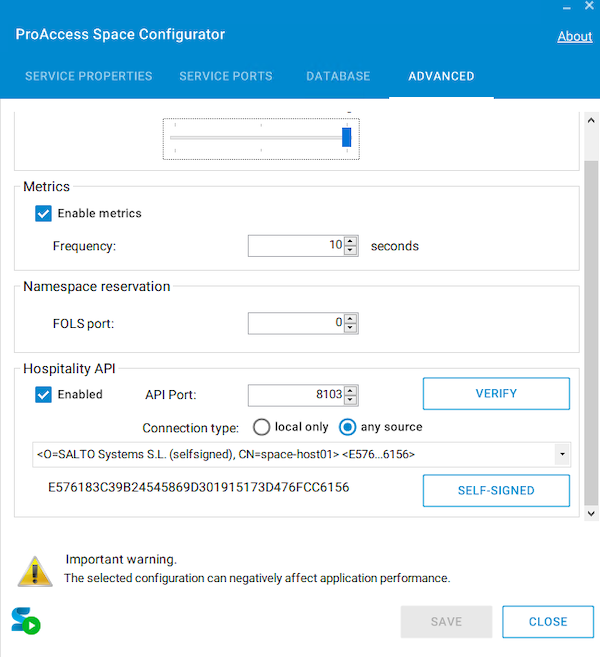 Ensure you select the 'Any source' option in the Space configurator
Generate and share API key: In Space, generate the API authentication key and share it with your Hospitality wallet key manager. See Wallet keys configuration for details.
Provide endpoint information: Share your public IP address or domain and port number with your Hospitality wallet key manager.
Important considerations
- If you need to change the public IP, port, or domain to which the Hospitality wallet key manager makes requests, you must notify your Hospitality wallet key manager to ensure proper adjustments in their configuration.
- The following characters are not allowed when naming rooms and keys: "?", "/", ":", "%", "#", and "". There may also be other special characters that are not permitted.
- Ensure that your network infrastructure can handle the expected volume of API requests.
- In the ProAccess Space Configurator, make sure you select the Any source option under Connection type so the Hospitality wallet key manager can make direct requests to the API.
- From Space v6.14 onwards, the Advanced tab in the ProAccess Space Configurator includes a Verify button for the Hospitality API.
Click Verify to send an HTTP request to
localhoston the configured API port and confirm the API is running and responding correctly.
Alternative integration options
If direct requests to your property's public IP or domain are not feasible, please get in touch with your Salto representative to explore alternative solutions. One such alternative is using a third-party wallet key provider, which handles the provisioning of wallet keys that can be used in Space environments.
 Back
Back
