Do Not Disturb
Residents can use Do Not Disturb to make themselves unavailable for calls without having to log out of the XS4 Com mobile app. This is useful for residents who are assigned to a call option, such as Reception, Deliveries or Security. They can switch Do Not Disturb on when they are off shift and switch it off when they are available again.
Do Not Disturb is set per site. If residents belong to more than one XS4 Com site, they should first select the right site from the drop-down menu at the top of the screen. Do Not Disturb will then apply only to that site.
To use Do Not Disturb, residents must do as follows:
- On the homepage of the XS4 Com mobile app, residents tap the Enable Do Not Disturb button to switch it on.
- While Do Not Disturb is on, residents will not receive XS4 Com visitor calls. The homepage shows a reminder that Do Not Disturb is on until they switch it off. All other features, such as remotely opening the door, keep working as usual.
- When residents are ready to receive calls again, they tap the Disable Do Not Disturb button to switch it off. From that moment, visitors can call them again.
While Do Not Disturb is on, visitors cannot call the resident. The site admin chooses how residents with Do Not Disturb on appear in the phonebook for each entrance. The resident is either:
- Hidden from the phonebook, so visitors cannot find them.
- Listed in the phonebook, but greyed out and marked as Not available, with no option to call.
If a resident is assigned to a call option (Reception, Deliveries or Security) and has Do Not Disturb on, they will be skipped when a visitor calls that option. Any other residents assigned to the same option will still receive the call. If every resident assigned to a call option has Do Not Disturb on, the option will be temporarily removed from the Welcome Screen until at least one of them switches Do Not Disturb off.
Site admins can see which residents have Do Not Disturb on.
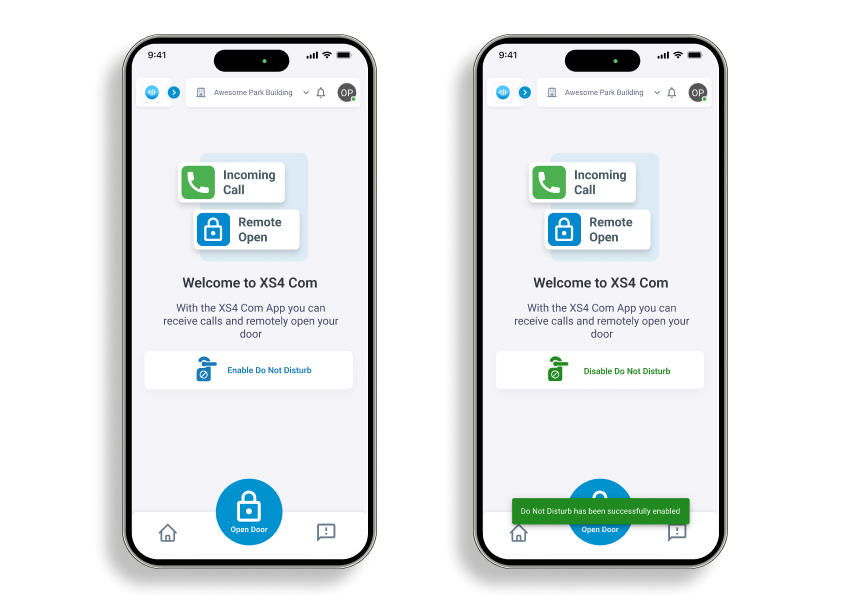 Tap the Do Not Disturb button to switch it on
 Back
Calls on the web app
 FAQs