Hotel guest wallet key service commissioning guide
Descripción general
This guide provides step-by-step instructions for Wallet Key Service Providers to set up and commission the Salto Space hotel guest wallet key service. The service enables hotel guests to use digital wallet keys (such as Room Key in Apple Wallet) to access their rooms via Salto access points.
By following this guide, you will be able to:
- Verify hardware and firmware compatibility requirements
- Configure the required Space licenses and software settings
- Set up the Hospitality API connection between Salto Space and your system
- Configure network and firewall rules for secure inbound connectivity
- Connect Space to the Salto WalletHub (dev or prod environment)
- Configure locks and readers for wallet key provisioning
This guide is intended for Wallet Key Service Providers working with a Salto Business Partner or the Salto team to deploy the wallet key solution at a property.
Integration setup
To ensure a successful integration setup, the following aspects must be addressed:
- Hardware compliance
- Ensure hardware and firmware versions are compliant.
- Space instance
- All required licenses must be active within Space.
SPACE-OPT-0041Wallet Guest KeysSPACE-OPT-0030Web Services defined by user
- The Space instance must be properly configured.
- Space Server must be accessible by Hospitality API calling software instance (inbound).
- All required licenses must be active within Space.
- Space integration setup
- Proper configuration of both outbound and inbound endpoints.
- Authentication credentials must be correctly set up and securely managed.
Solution architecture
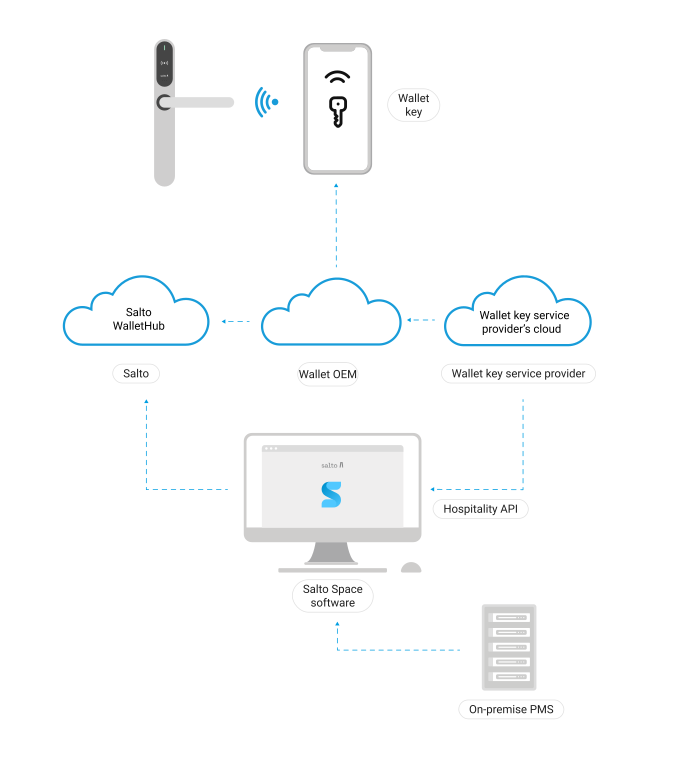 Space Hospitality API architecture
Hardware compliance
Please contact your usual Salto representative to confirm the hardware and firmware versions required for product compliance and testing purposes.
Existing vs. new installations
- Existing Space installation: All hotel guest-facing readers must be surveyed to confirm hardware and firmware compliance before going live. Any non-compliant devices will need a firmware upgrade.
- New installation: Wallet-enabled Salto devices must be purchased and installed at all hotel guest-facing access points, and updated to the latest available firmware version.
In both cases, complete and share the D3 Salto Asset Property Wallet HW Survey document with Salto.
Step-by-step configuration: assets
Before starting the configuration in Space, you will need the following:
- TCI: 3-byte unique identifier (a hexadecimal value made up of 6 characters) for the Wallet pass identification provided by the Wallet Key Service Provider.
- Wallet Key Service Provider's Hospitality API Endpoint information (Wallet Key Service Provider's IP address and port) will be required to configure the property-protecting firewall and Windows server rules allowing incoming connections.
- At the property level, the end customer (for example, the property's IT team) will need to configure both the property's firewall and the Windows server hosting Space to allow incoming connections.
- Space-hosting IP address and port number will need to be shared with Wallet Key Service Provider.
- WalletHub credentials must be obtained from Salto: to be securely provided to Wallet Key Service Providers by Salto.
WalletHub credentials are provided by Salto through a process that can take some time. Please make sure to submit the request with sufficient notice.
Step-by-step configuration: general
- The hardware must be compatible and the firmware must be updated to ensure compliance. In addition, the hardware has to be correctly SAM-configured during setup.
- Install a dedicated NCoder:
- Firmware number: 0172
- Firmware version: v01.15 or higher
- Software and infrastructure (Space instance, network configuration, etc.) must be compliant with the requirements specified in the Hospitality API documentation.
Network configuration
Network configuration requirements:
The solution requires allowing incoming connections to the Salto Space server. That means setting networking rules allowing incoming connections. It is highly recommended that such rules are kept as strict as possible. To do this, take into account the Space endpoint IP address and port, as well as the Wallet Key Service Provider IP address and port, in the inbound connectivity security rules (Firewall and Windows Defender Firewall rules).
See network configuration requirements in the Space Hospitality API documentation.
NCoder dongle
An NCoder working in dongle mode is required for Wallet Key provisioning (check-in, etc.).
In high-traffic environments where multiple guests are checking in simultaneously, consider installing multiple NCoder dongles to handle the increased credential issuing load.
See the section on how to add encoders to the Salto Network in Salto Space for more details.
Step-by-step configuration: Space
You need to configure Space as follows:
Space licenses
SPACE-OPT-0041
Add-on activates the Wallet Guest Keys required feature. Make sure the feature is active prior to proceeding.
SPACE-OPT-0030
Add-on activates the Web Services defined by user, which allows pointing to the WalletHub dev environment endpoint. This license is only required during integration/development. It is not required for production environments.
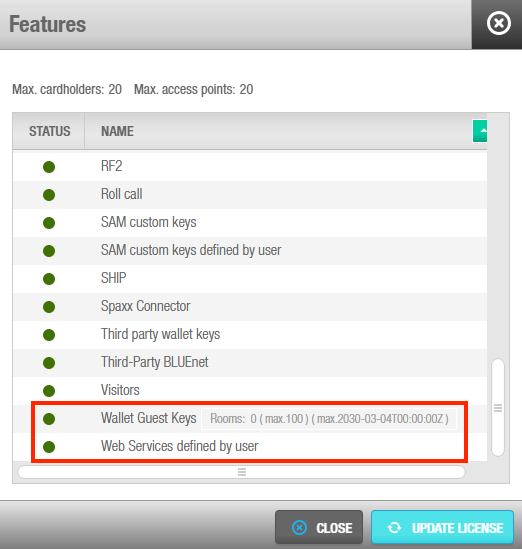 Space license options
Pointing to WalletHub Dev environment
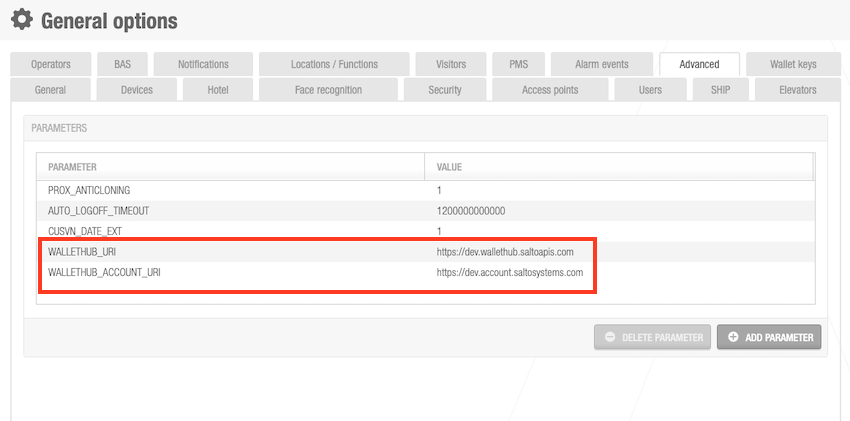 Space general options configuration - advanced parameters
Dev: ONLY while working in the development phase
- WALLETHUB_URI: https://dev.wallethub.saltoapis.com
- WALLETHUB_ACCOUNT_URI: https://dev.account.saltosystems.com
Prod: for production environments
- WALLETHUB_URI: https://wallethub.saltoapis.com
- WALLETHUB_ACCOUNT_URI: https://account.saltosystems.com
General options
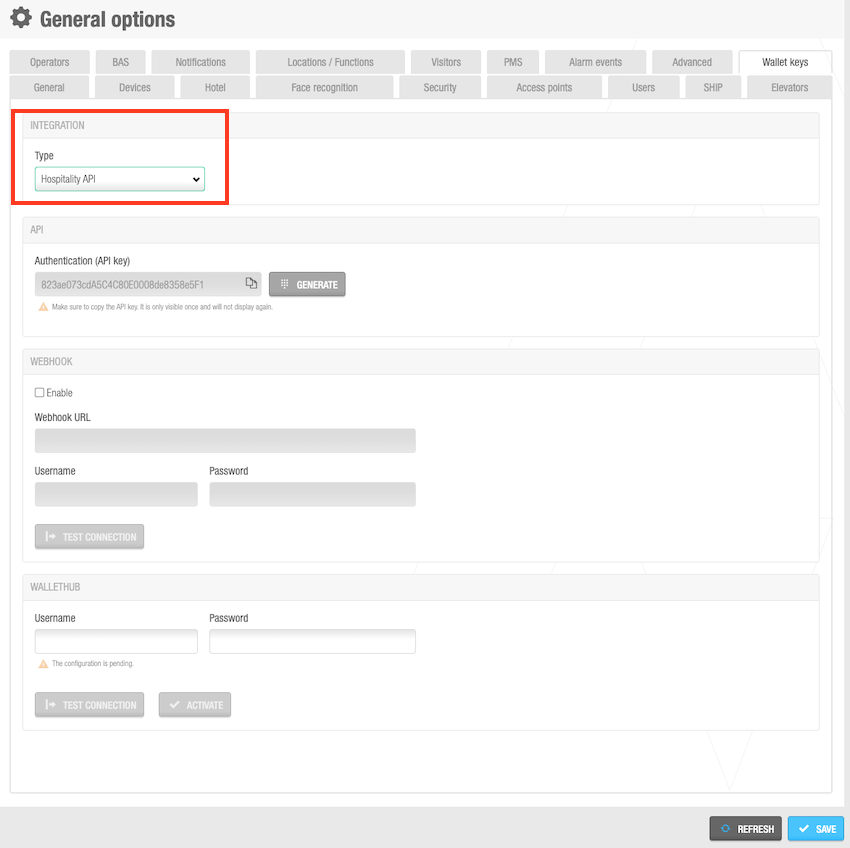 General options > Wallet keys
- Select System > General options > Wallet keys
- Select the Hospitality API integration type from the drop-down menu.
General options - API key generation
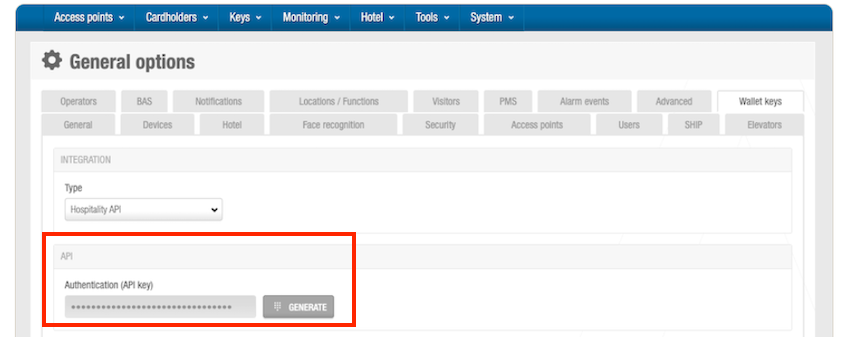 API key generation
- In the API panel, click Generate. The Authentication (API key) is automatically generated. This authentication key allows the connection between Space and Wallet Key Service Providers.
- Share the API key with the Wallet Key Service Provider: the same generated authentication key must also be used in the Wallet Key Service Provider's environment (for example, Alliants).
Space configurator
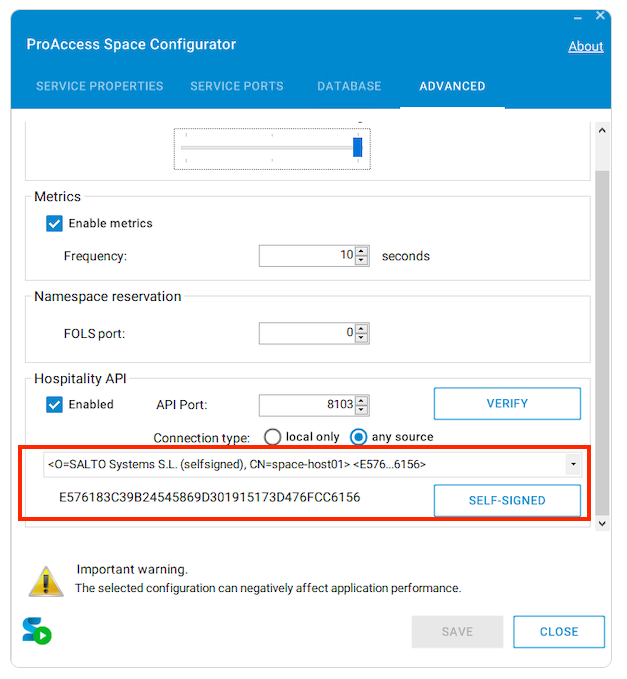 Space configurator
Configure the Hospitality API port from the Advanced tab in the ProAccess Space Configurator. The ProAccess Space Configurator icon is located on the desktop of the machine where Space is installed.
Certificates to be used:
- a) The customer can choose to send requests to a public IP or their own domain, using a CA-issued TLS certificate with a matching CN, which the integrator will verify.
- b) Self-signed certificates are also permitted.
- c) You can also use CA-verified certificates even if the requests are made to a public IP instead of a domain, but integrators cannot verify these certificates.
The same port must also be used in the Wallet Key Service Provider's environment.
See also Connectivity considerations for the Hospitality API
Webhook
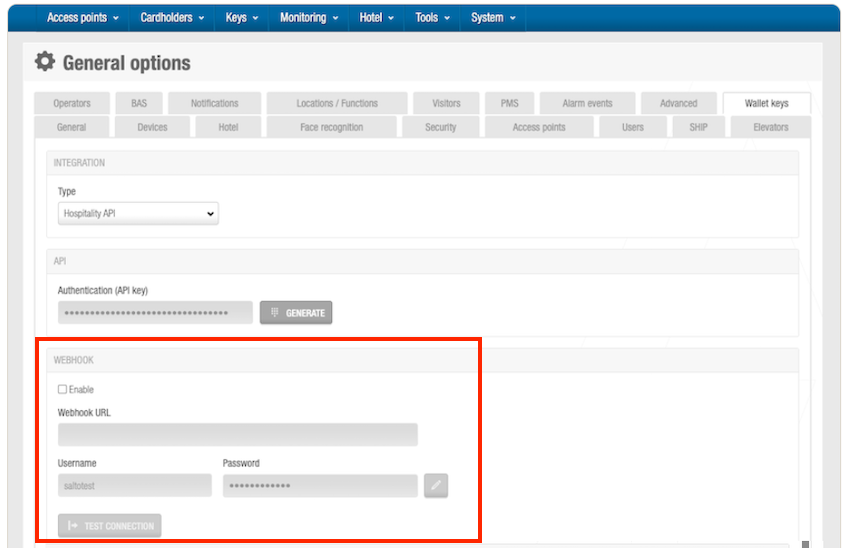 Webhook configuration
(Optional) Select the Enable checkbox in the WebHook panel of the Wallet keys tab in General options to activate it. You can use the webhook to receive notifications about changes affecting issued wallet keys. However, keep in mind that these notifications follow a best-effort approach and are not guaranteed to be delivered in all scenarios.
You will need to provide the following information to receive webhook notifications:
- Webhook URL: URL where you want to receive the notifications.
- Webhook username: username for basic authentication.
- Webhook password: password for basic authentication.
WalletHub
These details are provided by Salto through a process that can take some time. Please make sure to submit the request with sufficient notice.
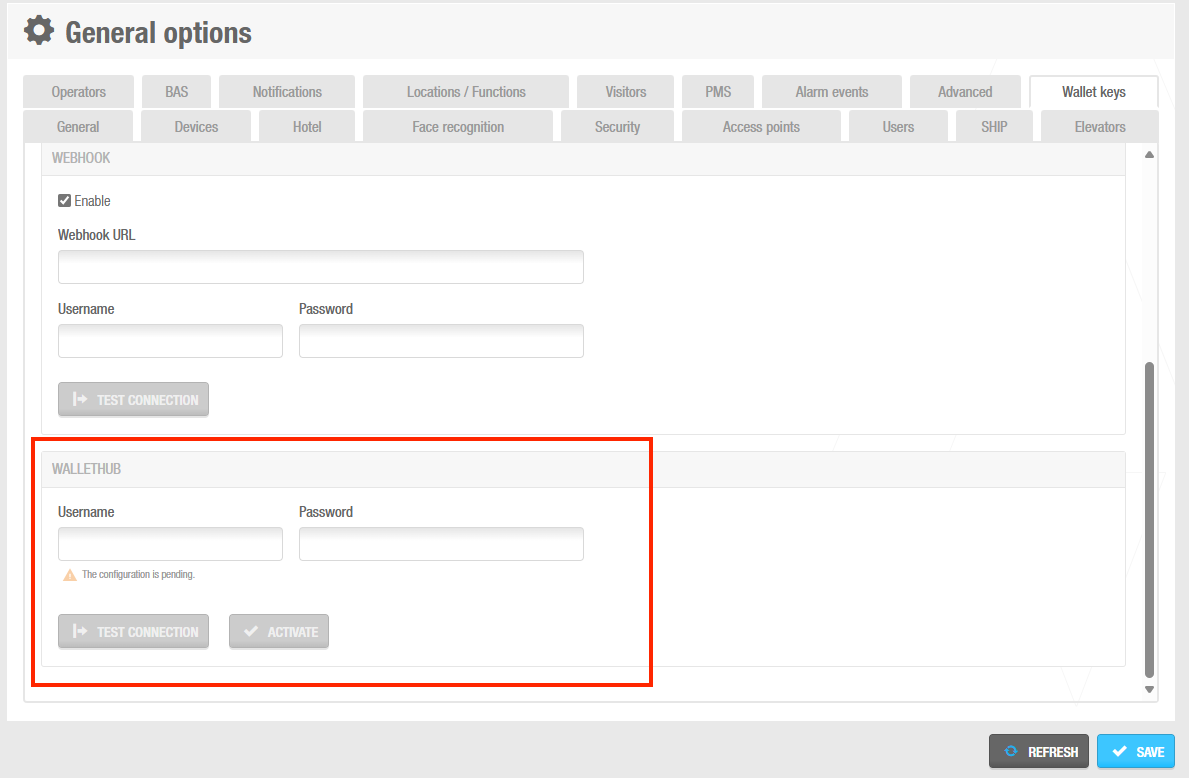 WalletHub configuration
- In the WalletHub panel, enter the username and password. These details are provided by Salto.
- Click Save.
- Click the Test connection button to verify the WalletHub data you have entered is correct.
- Once verified, click Activate. Wallet keys are now configured and ready to be used.
SAM & issuing
SAM & issuing configuration is required to enable the provisioning of wallet keys to the locks and readers.
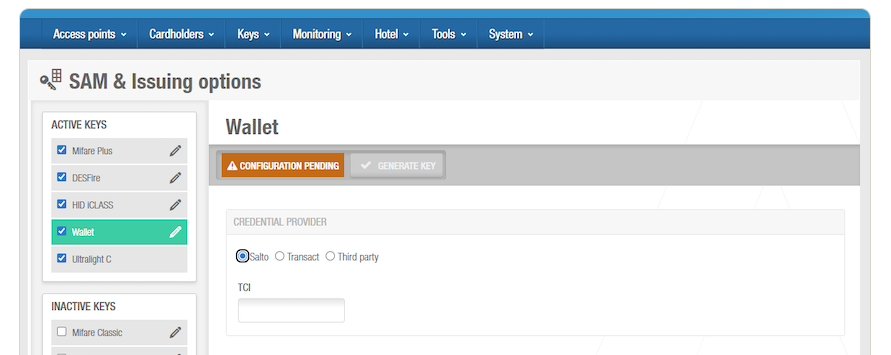 SAM & issuing configuration
- Select System > SAM & issuing options
- In the Active keys list, check Wallet
- In Credential provider select Salto
- Enter the TCI value (a hexadecimal value made up of 6 characters). The TCI value is provided by the Wallet Key Service Provider.
- Click Generate key to generate the key that will be used for wallet key provisioning.
- Configure Salto readers with a PPD (Portable programming device)
See the full SAM and issuing options for wallet keys section for more details.