Space-OnGuard connector
The Space-OnGuard connector is part of Salto IDM Connect. It is an on-premises Windows service that keeps Salto Space aligned with the cardholders, access levels, and readers you manage in Lenel OnGuard.
Lenel OnGuard stays the source of truth for cardholders, access levels, and readers. Salto Space receives them as users, keys, zones, and doors, and sends access and device events back to OnGuard as alarms.
What the connector synchronizes
| Data | Direction | Result |
|---|---|---|
| Cardholders and badges | Lenel OnGuard to Salto Space | Each cardholder becomes a Salto Space user, and each badge becomes a key. |
| Access levels | Lenel OnGuard to Salto Space | Each access level becomes a Salto Space zone that contains the doors of its readers. Users get the zones of their access levels. |
| Access panels and readers | Lenel OnGuard to Salto Space | Each reader becomes a Salto Space door. Doors start as offline, so set the online doors in Salto Space. |
| Access and device events | Salto Space to Lenel OnGuard | Access granted, access denied, and device communication events become alarm events in OnGuard. |
For details, see Space-OnGuard mapping.
How it works
The connector has two components that run as Windows services on a server in your network:
- The Web Configurator is the browser-based interface where you log in, license the connector, enter the connection settings, and monitor synchronization.
- The SyncAgent runs the synchronization in the background at the intervals you configure.
Both components store their configuration and synchronization logs in a Microsoft SQL Server database. The connector communicates with Salto Space over the SHIP protocol (Salto Host Interface Protocol) and with OnGuard over the OnGuard OpenAccess API. To send events to OnGuard, also install the OpenDevice translator add-on.
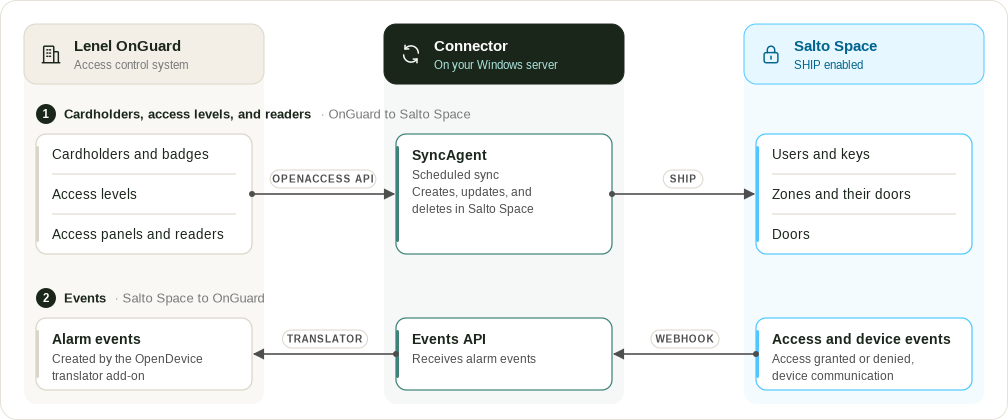
The data flows in these steps:
- The SyncAgent reads cardholders, badges, access levels, and readers from OnGuard.
- It creates, updates, and deletes the matching users, keys, zones, and doors in Salto Space over SHIP.
- Salto Space sends access and device events to the connector's Events API as alarm events.
- The OpenDevice translator collects those events from the Events API and creates alarm events in OnGuard.
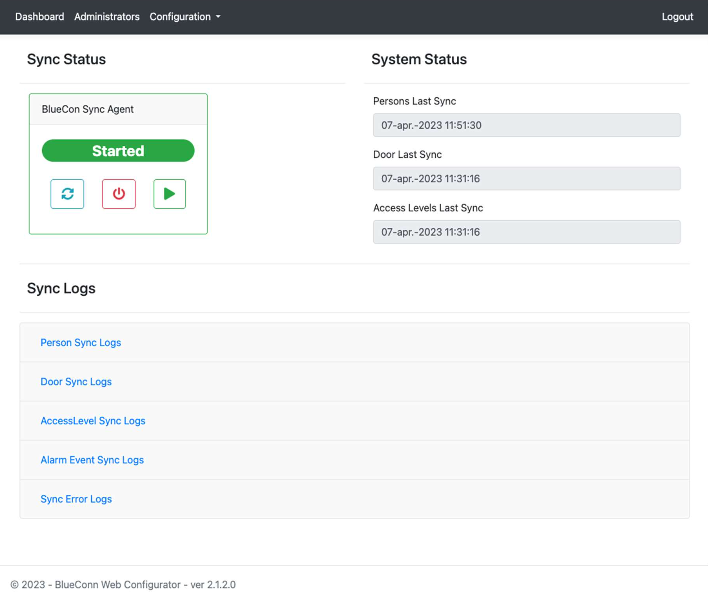 Dashboard overview of the Space-OnGuard connector
See the following sections to find out how to install and use the Space-OnGuard connector: