Introduction to the Space API
The Space API is part of Salto IDM Connect. It is a secure, Salto-hosted REST API that lets your applications manage identity and access data in Salto Space, such as users, keys, access levels, zones, and doors. Your application calls the API over HTTPS, and the API translates each request into the SHIP protocol (Salto Host Interface Protocol) for your Salto Space installation. The API stores no access data of its own, so Salto Space stays the source of truth.
To start, connect Salto Space to the Space API. The guides for developers are on the Salto developer portal, and the API reference is on the Space API site.
Developer documentation
API reference
Every endpoint, parameter, and data model in the Space API specification. Open the API reference.
Guides
Authenticate and manage users, access levels, zones, doors, mobile keys, and physical keys, step by step. Browse the guides on the developer portal.
What you can manage
Use the Space API to manage the following resources:
- Users: create, read, update, and delete users, including activation, expiration, PIN, and group membership.
- Access levels and zones: create, read, update, and delete the access levels and zones that control who can go where.
- Mobile keys: assign and cancel JustIN Mobile and JustIN Mobile SDK keys, and send JustIN Mobile SDK audit trails to Salto Space.
- Physical keys: assign, update, and cancel a user's card at a Salto Space encoder.
- Doors: manage door configuration and trigger remote (online) openings.
All resources are partition-aware, so a single integration can manage multi-site and multi-property environments.
How it works
Your application requests an OAuth2 access token, then calls the REST endpoints with that token as a bearer credential. The API authorizes each request, scopes it to your tenant, and meters it against your licensed API capacity.
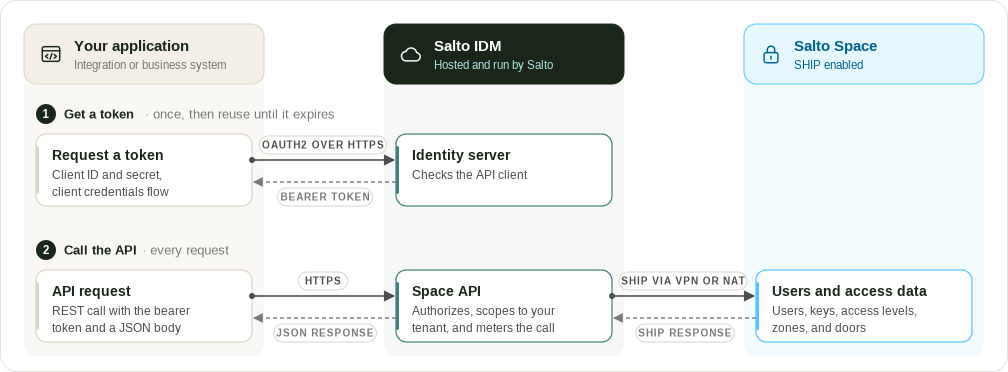
Each request follows these steps:
- Your application requests a bearer token from the Salto IDM identity server with its client ID and secret.
- It calls a Space API endpoint over HTTPS with the bearer token.
- The Space API authorizes the call, scopes it to your tenant, and meters it.
- The Space API reads or updates the data in Salto Space over SHIP, through your connection route.
- The Space API returns the result to your application as a JSON response.
| Property | Detail |
|---|---|
| Interface | REST over HTTPS, with JSON request and response bodies |
| Authentication | OAuth2 client credentials (bearer token) |
| Connection to Salto Space | SHIP protocol, through the connection route you choose |
| Hosting | Salto-hosted cloud service, with no customer hardware to run |
| Scope | Partition-aware, for multi-site environments |
What you need
Before your application can call the Space API, make sure you have the following:
- A Space API license. The API meters every call against the capacity of your license.
- SHIP enabled in Salto Space. The Space API reaches your Salto Space installation over SHIP.
- A connection route from the Space API to Salto Space. Use a Cloudflare tunnel, a site-to-site IPsec VPN, or your own connection.
- Credentials from Salto. Salto issues the client ID and secret for your application when it connects Salto Space to the Space API.
Connect Salto Space to the Space API walks you through each of these steps.
Support
Contact support-id@saltosystems.com to get help with the Space API, to request an IPsec VPN, or to request functionality that the API doesn't offer yet.
 Connect Salto Space