Connecting XS4 Com with Salto Homelok
How to connect with Salto Homelok
Homelok sites are commissioned outside of the Larry Commissioning application. When an installer is invited to commission XS4 Com on a Homelok site, that site needs to be already fully set up and created in Homelok. Before inviting the installer to XS4 Com, there are three steps either the site owner or the Salto business unit needs to take:
- On the Homelok web application, an API user must be created and added to the Homelok installation. This API user requires a specific ID, which is provided by the Salto team and must be included in the email address format of this user.
- The API user must be assigned as a Homelok property manager with the designated email address containing the XS4 Com installation ID.
- The installer who will commission XS4 Com must also be added to the Homelok installation as a property manager with the same email address defined in step 1.
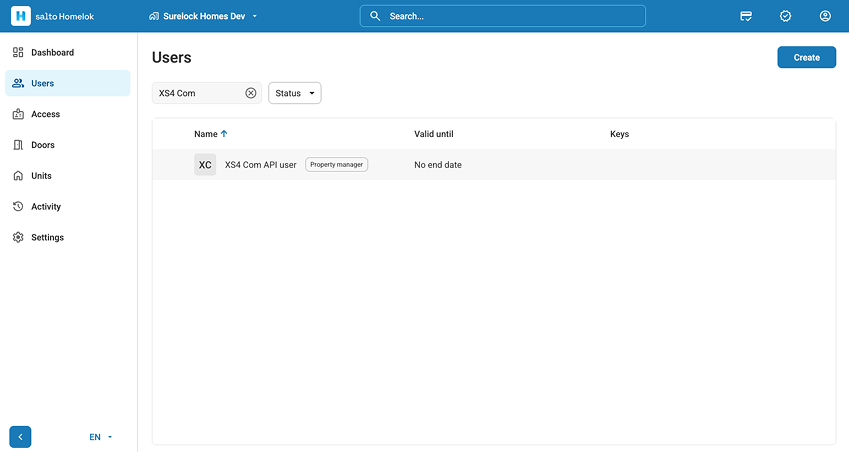 You must create an API user in the Homelok web application to enable the integration
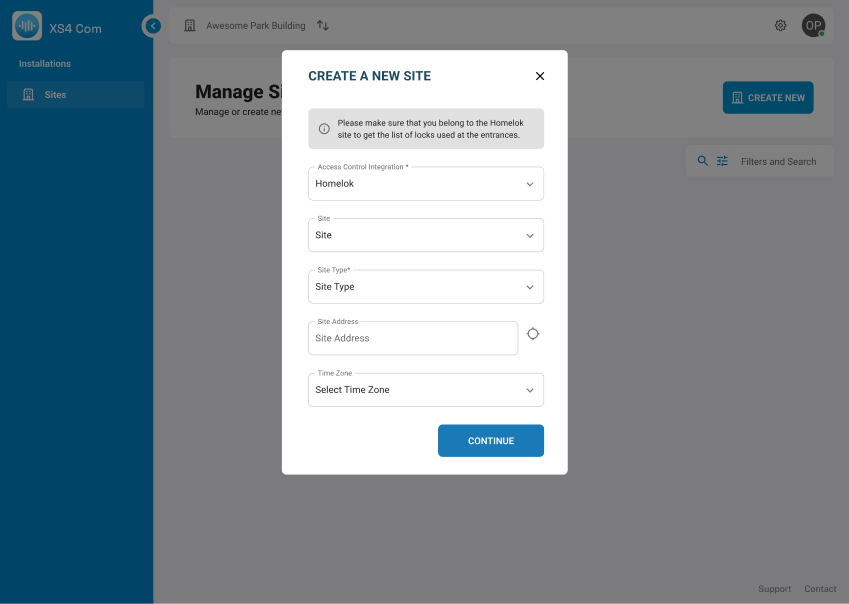 You need to ensure that Homelok is selected in the 'Access Control Integration' field
Once the steps above have been completed, the installer will be able to see the Homelok locks in the XS4 Com application. They can then begin to commission XS4 Com entrances on the Homelok site.
 Back
