Homelok release notes December 2025
2025-12-11
New activity detailsNew feature Homelok web
This feature is currently only available in Homelok web.
Each event type in the activity section now provides specific details relevant to that event. For example, Door unlocked will specify which user unlocked which door and the type of key used. An Access denied event will provide reasons for the denial, such as an expired key or lack of access rights.
When you hover over an event, an arrow now displays on the event entry in the activity list.
 Click on the event entry to view more details
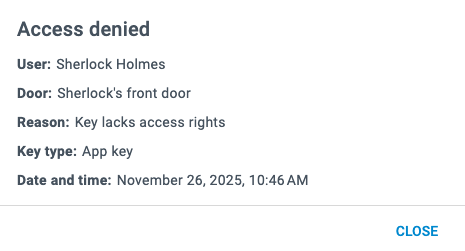 An access denied event showing information about the reason for denial
See the activity section for property managers for more information about the new activity details.
2025-12-09
New device configuration workflow Changed Nebula app
The device configuration workflow has been improved to make it easier to set up and manage devices in Homelok using the Nebula app.
Now, when you enter the Devices section of the Nebula app, it shows a list of nearby devices, like electronic locks or controllers, that can be selected and configured.
Previously configured devices display with their name, whereas new devices display their Device ID.
You can also filter the devices by using the Updated required or Not configured options.
See the section for installers for more information on configuring devices.
2025-03-12
Introducing the Salto DLok New feature Homelok web Homelok app Nebula app
Salto Homelok now supports the Salto DLok, a motorized smart lock designed for residential properties. The DLok is a versatile lock that can be effortlessly installed on existing doors without the need for major modifications. It is also compatible with a wide range of door types.
See the following sections in the user guide for more information about how to use the DLok in your Homelok installation: