Configurar la sincronización de fotos de Entra ID
Esta función está disponible a partir de Salto IDM v3.2.
1: Descripción general
Salto IDM puede sincronizar opcionalmente las fotos de perfil de usuario desde Microsoft Entra ID (anteriormente Azure AD). Cuando está habilitado, las fotos de usuario se importan y almacenan como parte del registro de identidad en Salto IDM para que:
- Las identidades de usuario en IDM incluyan una foto actualizada
- Se reduzcan las cargas manuales de fotos
- Los administradores tengan una vista coherente de las identidades de usuario en todos los sistemas
La sincronización de fotos es opcional y se controla mediante una configuración específica en la configuración de automatización de Entra ID.
La sincronización de fotos solo afecta a Salto IDM. No se envían datos de fotos de usuario a Salto Space como parte de esta función.
2: Requisitos previos
Antes de habilitar la sincronización de fotos:
Automatización de Entra ID existente Debes tener una automatización de Entra ID en funcionamiento configurada en Salto IDM que ya sincronice los atributos principales de identidad (nombre, correo electrónico, identificadores, etc.).
Permisos de Microsoft Entra ID La aplicación de Entra ID utilizada por Salto IDM debe tener permisos para leer las fotos de perfil de usuario a través de la API de Microsoft Graph.
Estos permisos requieren el consentimiento explícito del administrador.
Indicador de función (feature flag) de Fotos de usuario en IDM La función general de Fotos de usuario en IDM debe estar habilitada para tu entorno.
Si no estás seguro de si se han concedido los permisos correctos, ponte en contacto con tu administrador de Entra ID.
3: Configuración en Salto IDM
3.1 Ubicación de la configuración
La configuración se encuentra en:
Configuración > Automatizaciones > Microsoft Entra ID (automatización de Entra ID)
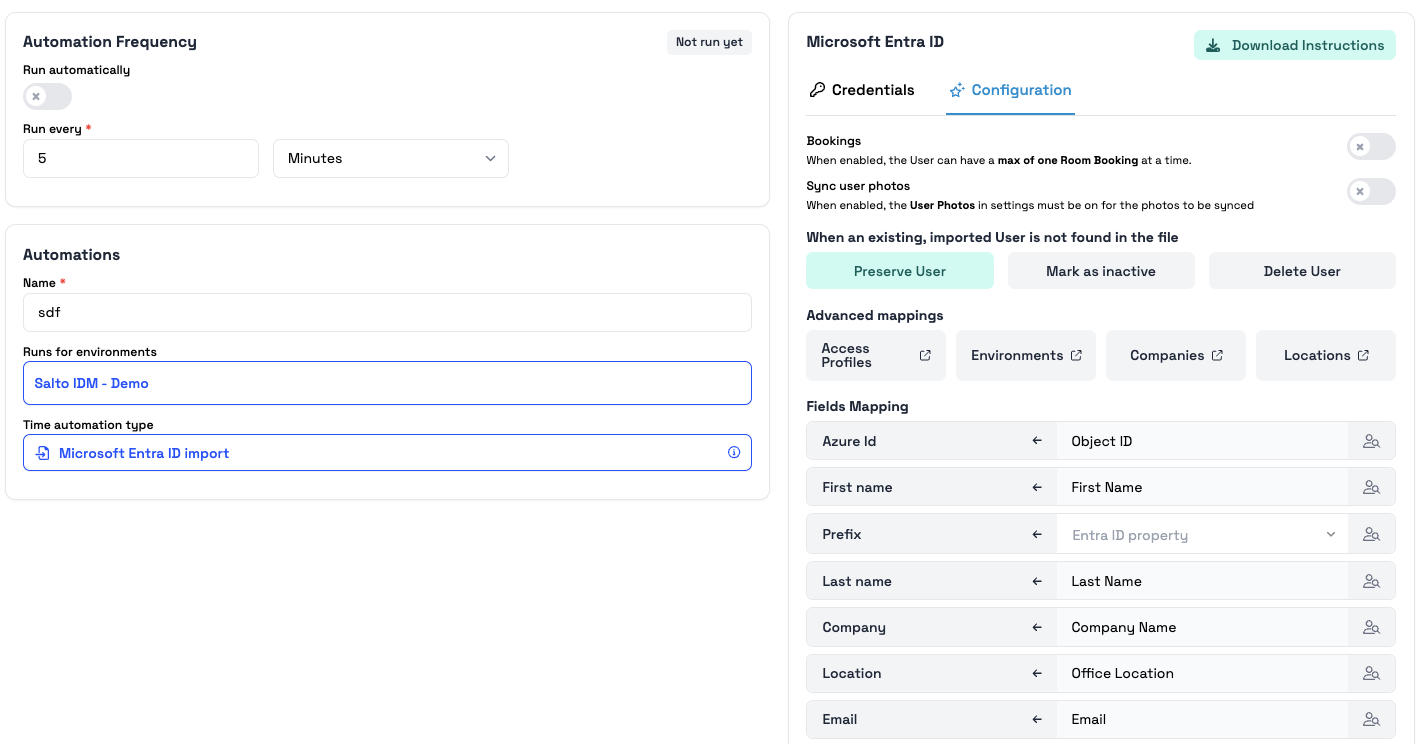
Dentro de la configuración:
- Fotos de usuario (cambiado de nombre de Imagen de usuario)
- Sincronizar fotos de usuario (nuevo interruptor)
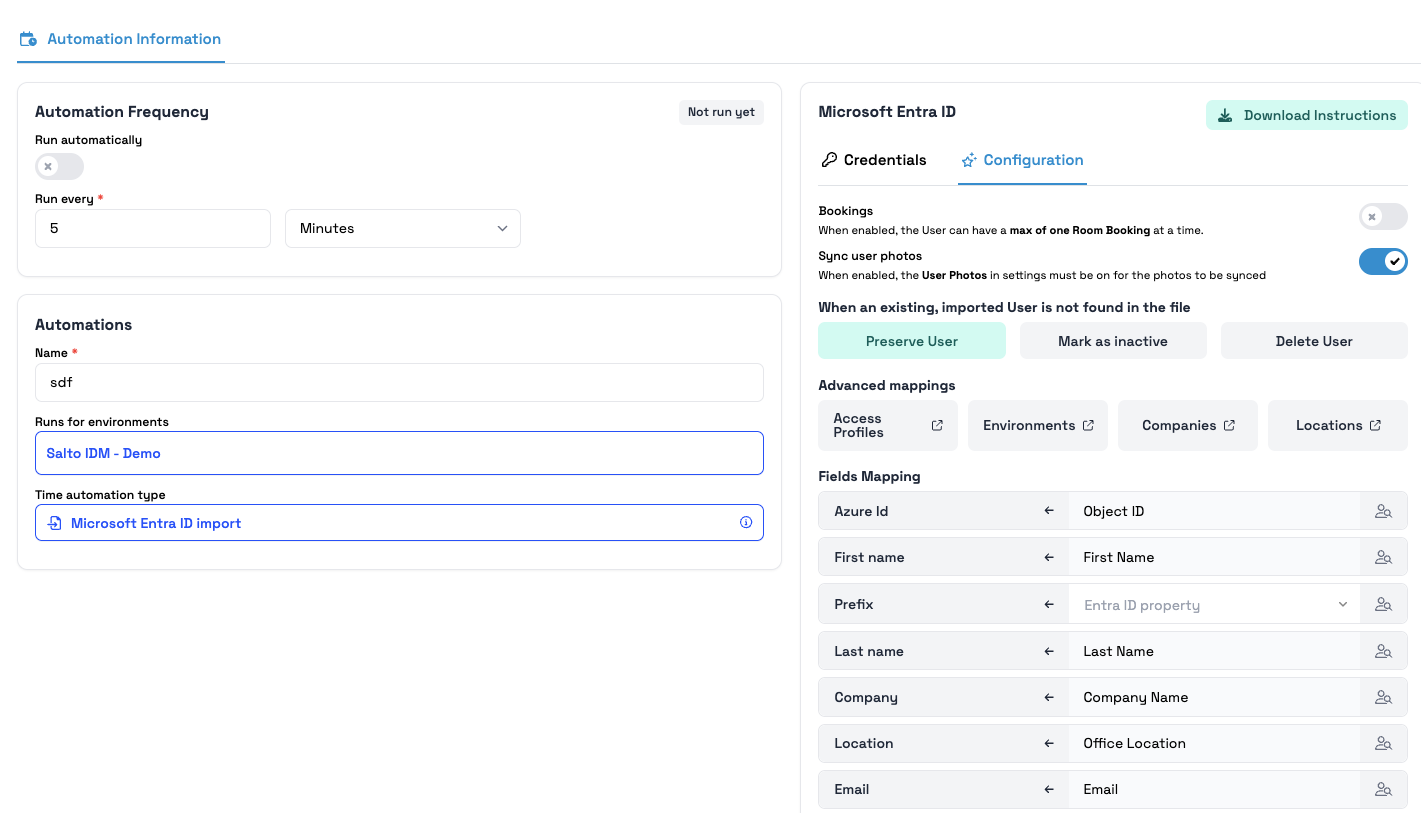
3.2 Interruptor 'Sincronizar fotos de usuario'
Hay un nuevo interruptor disponible:
- Etiqueta: Sincronizar fotos de usuario
- Título: Cuando está habilitado, la configuración de Fotos de usuario debe estar activada para que las fotos se sincronicen.
Comportamiento predeterminado
- Automatizaciones existentes: deshabilitado
- Nuevas automatizaciones: deshabilitado
No se sincronizan fotos a menos que se habiliten explícitamente.
4: Cómo funciona la sincronización de fotos
4.1 Cuando la función está habilitada
Para habilitar:
- Ve a la configuración de automatización de Entra ID.
- Asegúrate de que Fotos de usuario = ENCENDIDO.
- Habilita Sincronizar fotos de usuario.
- Guarda y ejecuta/programa la sincronización.
Cuando ambos interruptores están ENCENDIDOS:
- IDM recupera la foto de perfil del usuario de Entra ID a través de Microsoft Graph.
- La foto se almacena en el registro de identidad.
- En sincronizaciones posteriores:
- Si cambió > actualizado
- Si no cambió > ignorado
Si Fotos de usuario = APAGADO, no se sincronizan fotos aunque el interruptor esté encendido.
4.2 Cuando la función está deshabilitada
- Sin recuperación de fotos
- Sin actualizaciones
- Las fotos existentes permanecen sin cambios
5: Gestión de errores y registro
La sincronización de fotos no es bloqueante:
- Los errores solo afectan a la recuperación de fotos
- La sincronización de atributos principales continúa
La información registrada incluye:
- Acciones de sincronización de fotos
- Cambios detectados
- Errores o problemas de permisos
6: Seguridad y privacidad
- El acceso a las fotos sigue los permisos de Entra ID y el consentimiento del administrador.
- No se envían fotos a Salto Space.
- Los administradores deben revisar los requisitos de privacidad antes de habilitar.
7: Casos de uso típicos
- Portales y paneles de administración
- Experiencias de identidad en quioscos o terminales
- Equipos de soporte que identifican a los usuarios
8: Resolución de problemas
8.1 No aparecen fotos
Verifica:
- Fotos de usuario = ENCENDIDO
- Sincronizar fotos de usuario = ENCENDIDO
- Permisos de Graph + consentimiento del administrador
- El usuario realmente tiene una foto
- Registros de automatización
8.2 Solo algunos usuarios tienen fotos
- El usuario no tiene foto
- Restricciones de permisos
- Entradas de registro específicas del usuario
8.3 La foto no se actualiza
- La sincronización se ha ejecutado después del cambio
- Los registros muestran detección o errores
 Atrás
Atrás
