Configure Adaptive Recognition document scanner
How to configure Adaptive Recognition document scanner
This guide shows how to install and configure the Adaptive Recognition document scanner and the Document Scanner API for use with Salto IDM.
Realiza la instalación en la máquina local donde se conectará el escáner.
Follow the steps below to complete the setup and ensure the scanner operates reliably with the Virtual Front Desk.
Step 1: Download and execute the Adaptive Recognition installer
Get in touch with your usual Salto contact to find out how to obtain the installer.
Run the Adaptive Recognition drivers provided by Salto Support (pr-2.1.11.2-x64.msi).
Complete the installation wizard using the default options unless your environment requires specific settings or custom port configurations.
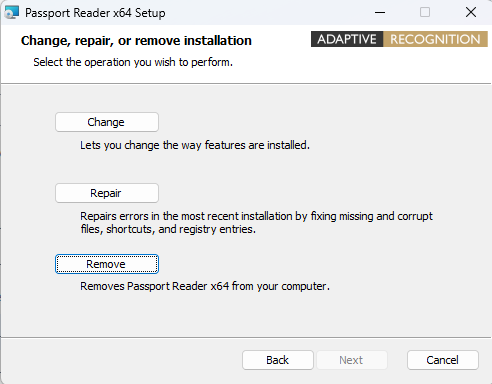
If an older version is already installed, the screen shown below will appear if you click on the installer of the old driver. First, remove the old drivers, then install the new ones.
Step 2: Install the Document Scanner API
Run the Document Scanner API (v2.4.0).exe installer provided by Salto Support.
Make sure to do this on the machine where the scanner is attached.
The API will by default listen on port 7210.
If a firewall or network policy is in place, ensure port 7210 is open between the Virtual Front Desk and the machine running the Document Scanner API.
Step 3: Configure the Virtual Front Desk in Salto IDM
- In Salto IDM go to Configuration > Virtual Front Desk and click on Edit.
- In Passport/ID Settings find the Passport Scanner URL field and add the IP (or computer name) of the machine running the API, plus the port and endpoint. By default use the following URL:
http://localhost:7210/api/Scanner- Save the Virtual Front Desk configuration.
Don't forget to restart the server or computer after installing a new version of .NET or after installing the Document Scanner API.
 Atrás
Atrás