Log files
If you experience issues with the app and contact our support team, log files can help identify the cause and the solution.
Below, you will find a guide on how to send log files to our support team. There are two different guides, depending on whether you are using the Danalock app on iOS or Android.
When sending the log file to us, please include the case number in the email subject. You can find the case number in the email you received after submitting your support request.
iOS
If you are using the Danalock app for iOS, you can send the log files by following these steps:
- Press the log file from the specific date when you experienced the issue.
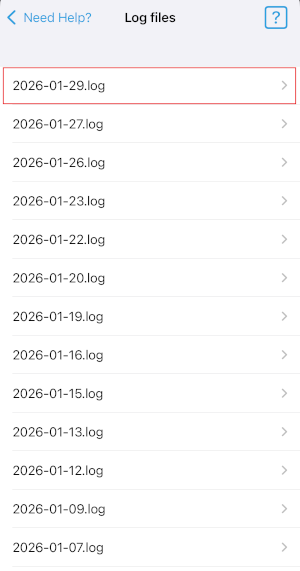 Open the log file by pressing the small arrow on the right-hand side
- Press the share icon in the upper-right corner.
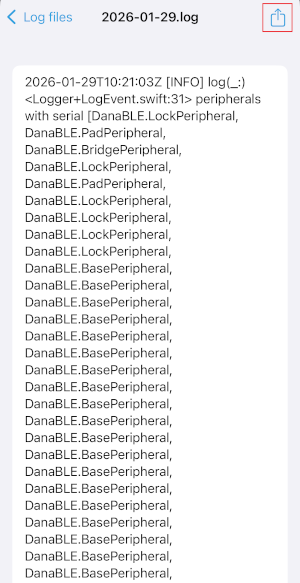 Press the share icon to send the log file to our support team
- Choose how you want to send it and enter
danalocksupport@saltosystems.com.
If you need to share log files from multiple dates, you need to repeat the steps above and send the log files in separate emails.
Android
If you are using the Danalock app for Android, you can send the log files by following these steps:
- Select the log files from the specific dates when you experienced the issue by pressing the small box on the right-hand side.
- Once you have selected the files you want to send, press the round green icon in the bottom-right corner.
- Choose how you want to send them, and enter
danalocksupport@saltosystems.com.
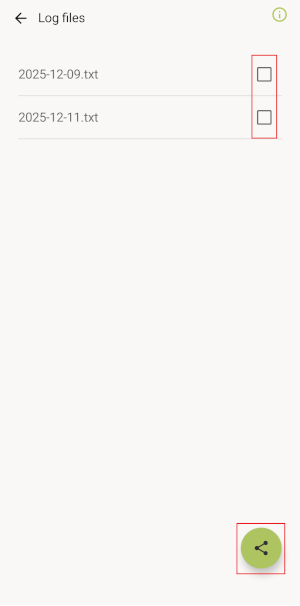 Choose the log files and press on the share icon to send the log files to our support team
 Back
iOS shortcuts
Back
iOS shortcuts